
Someone in a Telegram group offers to chat your Fanvue tonight. They seem to know what they're doing, and all they need is your email and password. Don't send them.
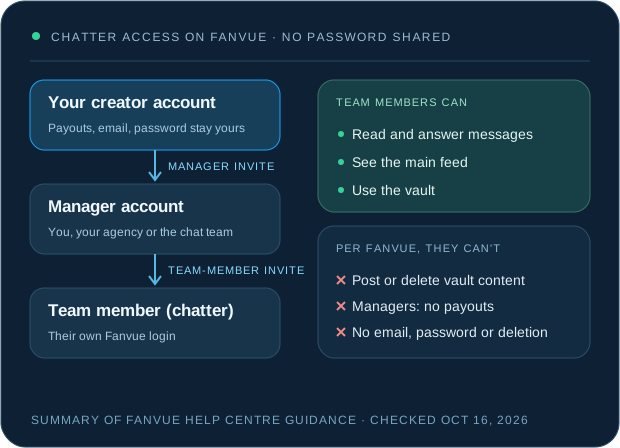
To add a chatter to Fanvue, use Fanvue's manager account system instead of sharing your login. You invite a manager account from your Settings, under Management. The chatter signs up as a normal Fanvue user with their own email, and the manager invites them as a team member. Team members work in messages, the feed and the vault. According to Fanvue, they can't post or delete vault content, and the manager can't reach your payouts, change your email or password, or delete your account.
The rest of this guide explains each step, what to check before the first shift, and where people usually get caught out.
Why sharing your Fanvue password is a bad idea
Your password opens everything: payouts, your email address, account settings, the lot. A chatter only needs the inbox.
A shared login also means you can't tell who sent what, and you can't remove one person without changing the password for everyone. If three people have it and one leaves on bad terms, you're resetting your account at 2 a.m. and hoping nobody changed the email first.
Be wary of anyone who asks for it. Fanvue says it won't ask for passwords through unsolicited messages, never sends in-app messages, and only emails from a verifiable @fanvue.com address. A chatter or “agency” asking for your password in a DM is a reason to stop the conversation, not a shortcut.
How Fanvue's manager and team-member accounts work
Fanvue's manager account guide describes two layers. A manager account is a single login that can switch between the creator accounts it manages. Team members sit under a manager and do the chatting.
| Role | How they join | What Fanvue lets them do |
|---|---|---|
| You (creator) | Your own account | Everything, including payouts and account settings |
| Manager account | Signs up on Fanvue's manager signup with a fresh email, then accepts your invite from Settings, Management | Switches between the creators it manages. Can't access payouts, change your email or password, or delete the account |
| Team member (chatter) | Signs up through the normal Fanvue signup, then accepts the manager's invite | Main feed, messages and the vault. Can't post or delete vault content, or publish on your behalf |
Two details catch people out. First, team members can see all the creator accounts under their manager by default. If you're an agency with five creators and you only want a new chatter on one of them, Fanvue's guidance is to set up separate manager accounts and invite the chatter to the right one. Second, Fanvue currently allows one manager account per creator, so decide early who holds it.
The checklist: adding a chatter to Fanvue
- Lock down your own account first.
In Settings, Account, Password & Security, turn on two-factor authentication. If you signed up with Google or X, Fanvue's account settings guide says you need to set a password before 2FA becomes available.
- Decide who holds the manager account.
You, your agency or your chatting agency. Fanvue says management and agency accounts can't enable 2FA, so whoever holds that login should keep it to one person and a strong, unique password.
- Create the manager account with a fresh email.
It has to be an address that's never been registered on Fanvue, using Fanvue's manager signup.
- Invite the manager from your account.
Go to Settings, Management and enter the manager's email. Fanvue's guide says whoever opens the invite link must be logged in as the manager account when they click it.
- Have the chatter make their own normal Fanvue account.
Regular signup, their own email. Not the manager signup, and never a login you made for them.
- Invite the chatter as a team member.
From the manager account's team members page, using the chatter's signup email. They need to be logged in to that account when they accept.
- Check the scope.
Log a note of which creators sit under that manager. If the chatter shouldn't see all of them, move them to a separate manager account before the first shift.
- Hand over the brief, not more access.
Persona, voice, boundaries, prices and who approves exceptions. Our Fanvue persona brief has a template. Keep passwords and payout details out of it.
- Test on the first shift.
Confirm the chatter can see messages and the vault, and read the first few conversations they send.
Stay in control after the chatter starts
Delegating the inbox doesn't delegate responsibility. Fanvue's compliance guidance tells creators to treat the account like a business they control, whether they work solo or with others. In practice that means a few rules your chatters follow from day one:
- Conversations stay on Fanvue. No “add me on Telegram.”
- Payments stay on Fanvue. No PayPal, no crypto, no side deals.
- No offers to meet fans in person.
- Only promise what you've approved and can deliver.
- On AI-model accounts, the AI disclosure stays clear, and nobody tells a fan a fully AI persona is a real person.
When someone leaves, remove their access the same day. Fanvue's manager guide doesn't spell out the removal steps, so check the team members page and Settings, Management when the time comes, and ask Fanvue support through the help centre's live chat if anything's unclear. If a password was ever shared in the past, change it, then use the option in your account settings to log out of all devices and sessions.
Giving access to a chatting agency
The same setup works for an agency. Before you send any invite, agree in writing which accounts they'll work on, which hours they'll cover, what they're allowed to offer and price, and how access ends if you part ways.
A good agency won't ask for your password to give you a quote. At Zinely, the initial estimate needs no account access at all. We agree the appropriate access during onboarding and review the scope with you before chatting starts, and you keep ownership of the account. When the account and access are ready, our Fanvue chatting team usually starts within 24 hours of first contact.
Our human chatters send every message. AI only works inside our own tools, giving each chatter the fan's history before they reply. If you're still weighing up whether to bring in a team at all, the Fanvue chatting guide and our breakdown of chatter costs are the places to start.
Common questions
Can a Fanvue chatter see my payouts?
Fanvue says manager accounts can't access payouts, change the account's email or password, or delete the account. Team members are limited to the main feed, messages and the vault. Check the current help centre article before you rely on this, as permissions can change.
Can two agencies manage the same Fanvue account?
Fanvue currently allows one manager account per creator. If you want two teams involved, agree who holds the manager account and add the other people as team members under it.
Can a chatter post on my Fanvue page?
According to Fanvue, team members can't post or delete vault content and can't publish content on the creator's behalf. Their role is chatting and content review.
Do I need to give Zinely my password for an estimate?
No. The estimate needs no account access. Access is agreed during onboarding, and you keep ownership of the account.
Fanvue sources, checked October 16, 2026: Manager accounts and team members (invites, permissions, default scope, one manager per creator); Account settings (2FA, management accounts can't enable 2FA, log out of all devices); Phishing and impersonators (Fanvue won't ask for passwords in unsolicited messages); Staying compliant (keep conversations and payments on Fanvue, no in-person meetings); AI content rules. Platform features and policies change, so recheck the linked pages before you rely on them.
Written by the Zinely team. Chat examples and numbers marked illustrative are not client data. Commercial terms are Zinely's published offer; final terms are agreed before launch.